Best Website Tracking Tools in 2026: PostHog, Klickbee Tracking, Matomo, Clarity
We compared four website tracking tools for B2B sites: PostHog, Klickbee Tracking, Matomo and Microsoft Clarity. Comparison table, pricing, privacy and who each one is for, with screenshots.
Louis Mauclair · CEO
Updated October 2026 · 8 min read
Google Analytics 4 gives you numbers, but rarely the reason behind them. To understand why a page underperforms, you need to see what visitors actually do: where they click, where they stop reading, and when they get frustrated. We compared four website tracking tools we use ourselves or install for our B2B clients: PostHog, Klickbee Tracking, Matomo and Microsoft Clarity. For each one: what it does, what it costs, what it means for privacy compliance, and who it is for.
Disclosure: Klickbee Tracking is the tool we built. To stay objective, we scored it with the same grid as the other three, and it does not come first: PostHog remains the most complete platform. Klickbee Tracking is, however, our pick for a B2B or e-commerce site that runs ads and wants replays, heatmaps and server-side conversions without a cookie banner for audience measurement.
Key takeaways
PostHog: the most complete product toolkit (analytics, replays, feature flags, A/B tests, surveys). Great for a SaaS product team, heavy for a marketing site.
Klickbee Tracking: cookieless analytics, replays, heatmaps, funnels, frustration signals and server-side conversions to Meta and Google Ads in a single script. Free for one site (1,000 sessions per month), $9.99 per month on Pro.
Matomo: the best-known Google Analytics alternative, free to self-host, with EU cloud hosting from €29 per month.
Microsoft Clarity: free, unlimited heatmaps and replays, but it relies on cookies and has required a consent signal for European visitors since October 31, 2025.
How we compared these tools
We looked at each tool through the questions a B2B marketing leader asks, not a developer:
Behavior: session replays, click and scroll heatmaps, frustration signals.
Conversion: goals, funnels, attribution by channel and campaign.
Ad platforms: sending conversions to Google Ads and Meta, ideally server-side.
Privacy: cookies set, consent requirements, where data is hosted.
Real cost: free tier and price for a B2B site with a few thousand sessions a month.
Setup: time to useful data without a developer.
Klickbee Tracking screenshots come from our own account on klickbee.com. Matomo, Clarity and PostHog screenshots come from their public demos and official websites. Prices are those listed on each vendor's website in October 2026.
At a glance
The criteria that matter for a B2B site, tool by tool, with our score out of 5:
Starting price: PostHog: Free up to 1M events per month ; Klickbee Tracking: Free (1,000 sessions per month), Pro at $9.99 per month ; Matomo: Free self-hosted, cloud from €29 per month ; Microsoft Clarity: Free.
Cookies for audience measurement: PostHog: Configurable ; Klickbee Tracking: None ; Matomo: Configurable (cookieless mode) ; Microsoft Clarity: Yes, consent required in Europe.
Session replays: PostHog: Yes, 5,000 per month free ; Klickbee Tracking: Yes, 7 days (Free) or 60 days (Pro) ; Matomo: Paid add-on ; Microsoft Clarity: Yes, unlimited.
Frustration signals: PostHog: Rage clicks ; Klickbee Tracking: 5 signals, incl. dead clicks and JS errors ; Matomo: Not built in ; Microsoft Clarity: Rage clicks and dead clicks.
Funnels: PostHog: Yes ; Klickbee Tracking: Yes, with the biggest leak flagged ; Matomo: Yes, depending on plan ; Microsoft Clarity: Yes, basic.
Server-side Google Ads and Meta conversions: PostHog: Through integrations ; Klickbee Tracking: Built in (Pro) ; Matomo: Not built in ; Microsoft Clarity: No.
Best for: PostHog: SaaS product teams ; Klickbee Tracking: B2B and e-commerce sites running ads ; Matomo: Replacing GA4 while owning your data ; Microsoft Clarity: A free first diagnosis.
1. PostHog: the most complete platform
PostHog is a suite for product teams: event analytics, session replays, feature flags, A/B tests, surveys and a data warehouse. Its code is public and it offers EU hosting.
What you can do with it
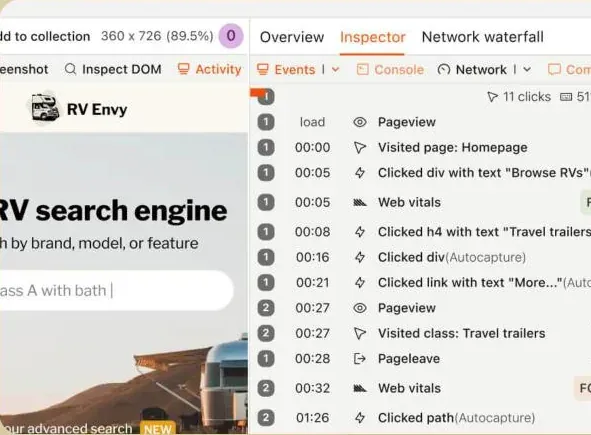
Track every event in your app with autocapture, then build funnels, cohorts and retention analyses.
Replay sessions alongside the console, network requests and page performance, which is great for debugging.
Roll a feature out to a share of users with feature flags and A/B test it.
Pricing
Free up to 1 million analytics events per month and 5,000 web session recordings per month. Beyond that, usage-based pricing that drops with volume.
Best for
SaaS companies with a product team and developers. On a B2B marketing site, its depth quickly turns into complexity: you have to define your events, and privacy configuration (cookies, consent) is on you.
2. Klickbee Tracking: the best pick for a B2B site that runs ads
Klickbee Tracking puts into one script what usually takes three tools: audience measurement, behavior analytics and sending conversions to ad platforms. Klickbee sets no cookies and does no fingerprinting, so audience measurement runs without waiting for consent; only your ad pixels wait for the visitor's opt-in.
What you can do with it
Session replays with frustration moments flagged on the timeline (rage clicks, dead clicks, quick-backs, JavaScript errors, rage scrolls).
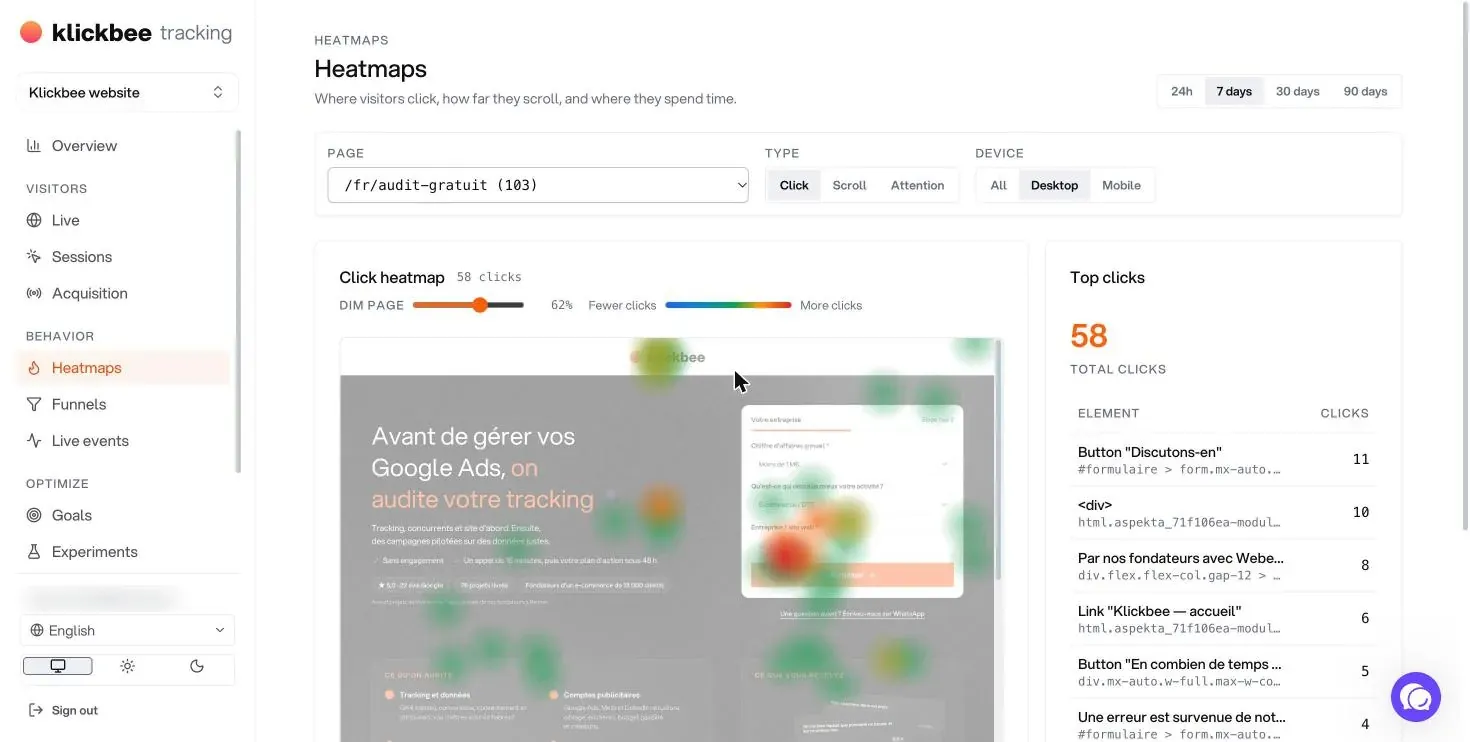
Heatmaps for clicks, scroll and attention, split between desktop and mobile, rendered on the live page.
Funnels, navigation paths and retention, with the biggest leak flagged automatically.
Goals and conversions sent to Google Ads, Meta and LinkedIn, including server-side conversions that survive ad blockers.
Pixel management and a consent banner generated by the tool, with no redeploy.
AI: a summary of every session, goal and funnel ideas, and a Claude connection to query your data in plain English.
The AI summary above comes from a real session on our site: the tool spotted two dead clicks on a form, inferred the visitor's intent ("requesting a free audit") and scored the friction at 72 out of 100. That is exactly the kind of problem a GA4 report never shows.
Pricing
Free: $0, one site, 1,000 sessions per month, analytics, heatmaps, funnels, 7-day replay history, 180-day event history.
Pro: $9.99 per month, unlimited sessions, AI, 60-day replays, server-side Meta and Google Ads conversions, Claude connection.
Best for
B2B and e-commerce sites running ads that want to know why their pages convert, without stacking GA4, Hotjar, a tag manager and a cookie banner. We cover every feature in our complete Klickbee Tracking guide.
Limits
A newer tool: fewer integrations than PostHog and no self-hosting. A/B tests need one line of code on your site.
3. Matomo: the Google Analytics alternative that keeps your data yours
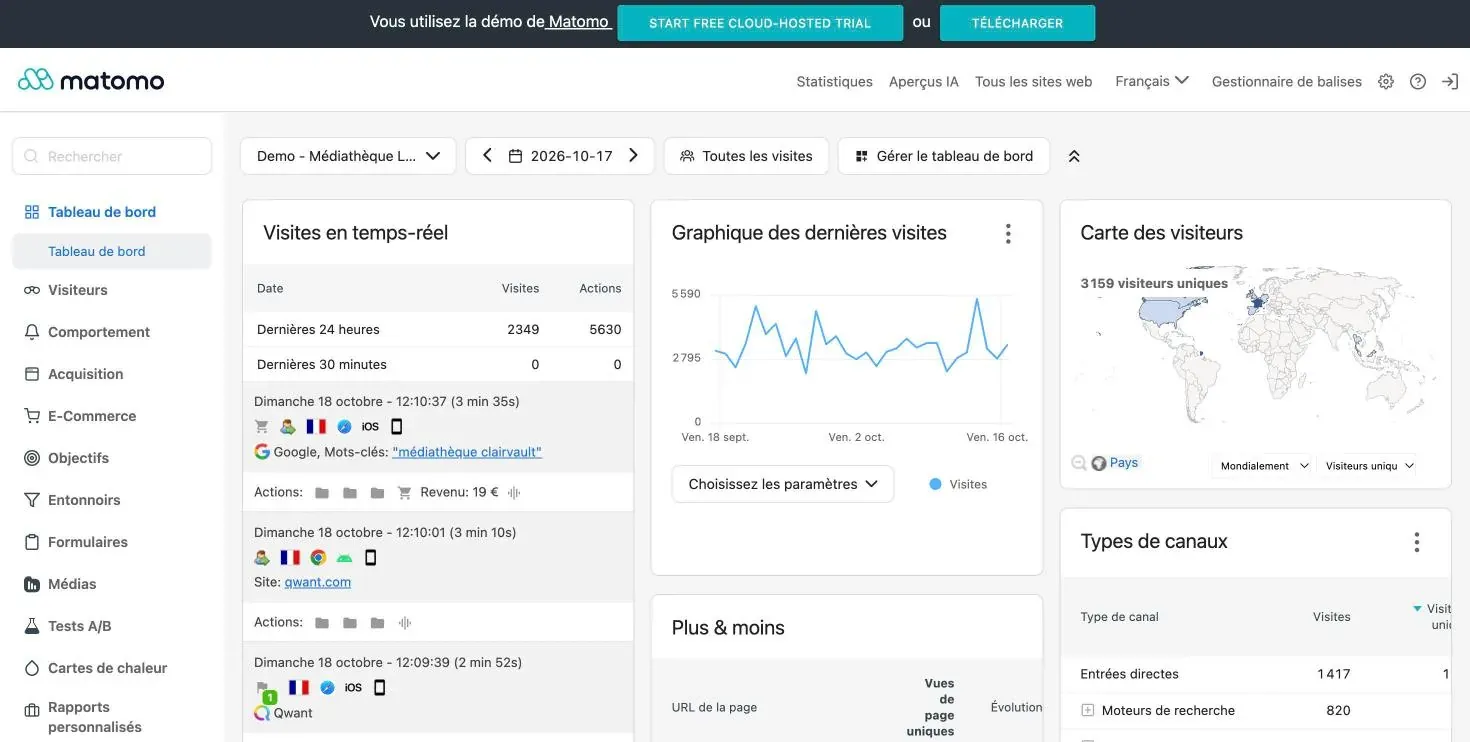
Matomo is the go-to tool for replacing Google Analytics while owning your data. It looks and works like classic web analytics: visits, sources, pages, goals, e-commerce. It can be configured to run without cookies, which in some jurisdictions lets you measure audience without consent.
What you can do with it
All the standard web analytics reports: acquisition, behavior, goals, e-commerce, funnels, forms.
Heatmaps and session recordings, depending on the plan.
A built-in tag manager and AI insights in recent versions.
Pricing
Self-hosted (On-Premise): free and unlimited for the core product. Heatmaps and recordings are paid, starting with the Team bundle.
Cloud: from €29 per month (excl. tax), data hosted in Frankfurt, free trial.
Best for
Organizations moving off GA4 that want familiar reports and full data ownership, especially in the public sector and healthcare. Self-hosting needs a server and some maintenance, and the interface is dense for a small marketing team.
4. Microsoft Clarity: the free diagnosis, with privacy strings attached
Clarity is free with no traffic limit. It offers heatmaps, replays and frustration metrics (rage clicks, dead clicks, excessive scrolling), plus an AI assistant that summarizes sessions.
What you can do with it
Find dead zones and unresponsive buttons on a page within days.
Filter replays by page, device, source or behavior.
Connect it to Google Analytics to cross-reference data.
Pricing
Free.
Best for
A quick first diagnosis on a site that has never been analyzed. For European traffic: Clarity sets cookies, and since October 31, 2025 Microsoft requires a valid consent signal for visitors from the European Economic Area, the UK and Switzerland. Without it, Clarity stops collecting data for those visitors, so your heatmaps only cover part of your traffic. Data is hosted by Microsoft in the United States.
Which tracking tool should you choose?
You run a SaaS product with a product team: PostHog.
You want to know why your pages do not convert, and feed your Google Ads and Meta campaigns: Klickbee Tracking.
You want a GA4 equivalent while keeping your data: Matomo.
You want a free first look and can live with the consent requirement: Microsoft Clarity.
The most common mistake we see with clients: stacking GA4, Clarity, a tag manager and three ad pixels with no defined goals. The result is a cookie banner refused by one visitor in four, conversions that never reach Google Ads, and nobody watching the replays. One well-configured tool with five clear goals beats four tools wired together badly.
FAQ
What is the best Google Analytics alternative?
It depends on what you need. Matomo is the closest to GA4 in terms of reports. Klickbee Tracking goes further on behavior (replays, heatmaps, frustration) and ad conversions, without cookies. PostHog is better suited to analyzing a SaaS product.
Is there a cookieless tracking tool?
Yes. Klickbee Tracking sets no cookies for audience measurement, and Matomo can be configured without cookies. Ad pixels (Google Ads, Meta, LinkedIn) do set cookies and still need consent, whatever analytics tool you use.
Is Microsoft Clarity GDPR compliant?
Clarity sets cookies and transfers data to Microsoft. Since October 31, 2025 it must receive a consent signal for European visitors, otherwise it does not collect their data. It can be used lawfully with a properly configured consent banner.
PostHog or Matomo?
PostHog if you analyze a product (app, SaaS) with a technical team. Matomo if you want classic web reports close to Google Analytics and control over hosting.
Do I need a developer to install these tools?
Not for Klickbee Tracking, Matomo Cloud or Clarity: one script in your site's head, or a WordPress plugin. PostHog and self-hosted Matomo need more technical setup.
Need help setting up your tracking?
Reliable tracking is the foundation of every marketing decision: without it, your campaigns and SEO run blind. We install and configure tracking for our clients as part of our marketing analytics consulting. To know where to start, get your free action plan: we identify the three highest-impact levers for your site.
Louis leads growth and digital acquisition for B2B and e-commerce companies in France and the UAE. Before Klickbee, he co-built and sold an e-commerce business that served more than 13,000 customers. He moved to Dubai in 2026 to work with companies across the GCC.
How Klickbee Tracking works, screen by screen: cookieless analytics, session replays with AI summaries, heatmaps, funnels, frustration signals and server-side conversions to Google Ads and Meta.
What bounce rate really measures in GA4, how to calculate it, what a good bounce rate looks like by page type, and 12 concrete fixes to lower it on a B2B site.






 Louis Mauclair8 min read