Klickbee Tracking: The Complete Guide to Cookieless Analytics
How Klickbee Tracking works, screen by screen: cookieless analytics, session replays with AI summaries, heatmaps, funnels, frustration signals and server-side conversions to Google Ads and Meta.
Louis Mauclair · CEO
Updated October 2026 · 8 min read
Klickbee Tracking is the analytics tool we built for our own needs, then opened to everyone. It answers one question: why don't your visitors convert? A single script measures your audience without cookies, records sessions, draws heatmaps, flags frustration and sends your conversions to Google Ads and Meta. This guide walks through how it works, screen by screen, with screenshots from our own account on klickbee.com.
Key takeaways
One script, all your tracking: audience, replays, heatmaps, funnels, goals, ad pixels and a consent banner.
Cookieless: Klickbee sets no cookies and does no fingerprinting. Audience measurement does not wait for consent; only your ad pixels do.
Built for conversion: automatic frustration signals, the biggest leak in every funnel, server-side conversions to Meta and Google Ads.
AI built in: a summary of every session, goal and funnel ideas, and a Claude connection to ask questions in plain English.
Pricing: free for one site up to 1,000 sessions per month, $9.99 per month on Pro.
Setup: one script and you are live
Create your site in the app, copy the script and paste it into your site's head tag. On WordPress, use your theme header or an "insert headers and footers" plugin. For Next.js or React, there is an npm package. Klickbee also runs on Webflow, Shopify and any HTML site.
Allowed origins: list the domains allowed to send data, so nobody can pollute your stats with your key.
Verification: the screen shows whether the script is installed and when data last arrived. The "Test pixel" button loads the script in a window and confirms it works.
Team: invite colleagues as viewers or admins, site by site.
Data arrives on the next page view. There is nothing to configure for clicks, scroll and frustration signals: they are captured automatically.
The dashboard: what matters on one screen
The overview shows pageviews, events, sessions and visitors over 24 hours, 7, 30 or 90 days, with a trend chart, top pages and top events. "Customize" lets you choose which blocks appear. The Live view shows who is on the site right now, their page and their country on a map.
Acquisition: where your visitors come from
The Acquisition screen breaks sessions down by channel (paid, direct, organic search, referral, social), with visitors, pages per session and each channel's share. Below, you get sources, mediums, social networks, campaigns, terms and ad content read from UTM parameters and the gclid. You see which Google Ads keywords bring visitors who stay, not just clicks.
Sessions and replays: see what your visitors see
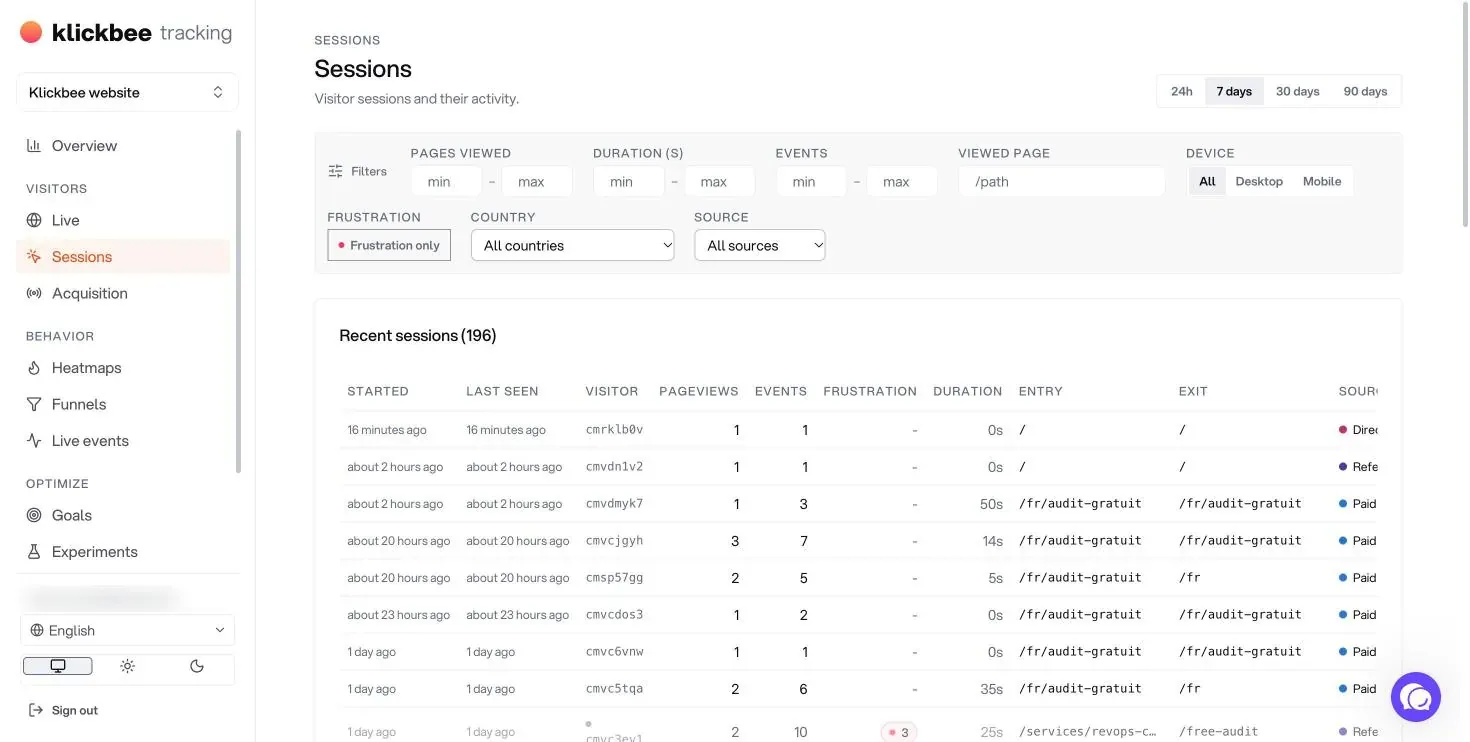
The session list filters by pages viewed, duration, events, viewed page, device, country, source and, above all, frustration: "Frustration only" keeps just the sessions where a visitor hit a problem. Each row shows the entry page, exit page, source and location.
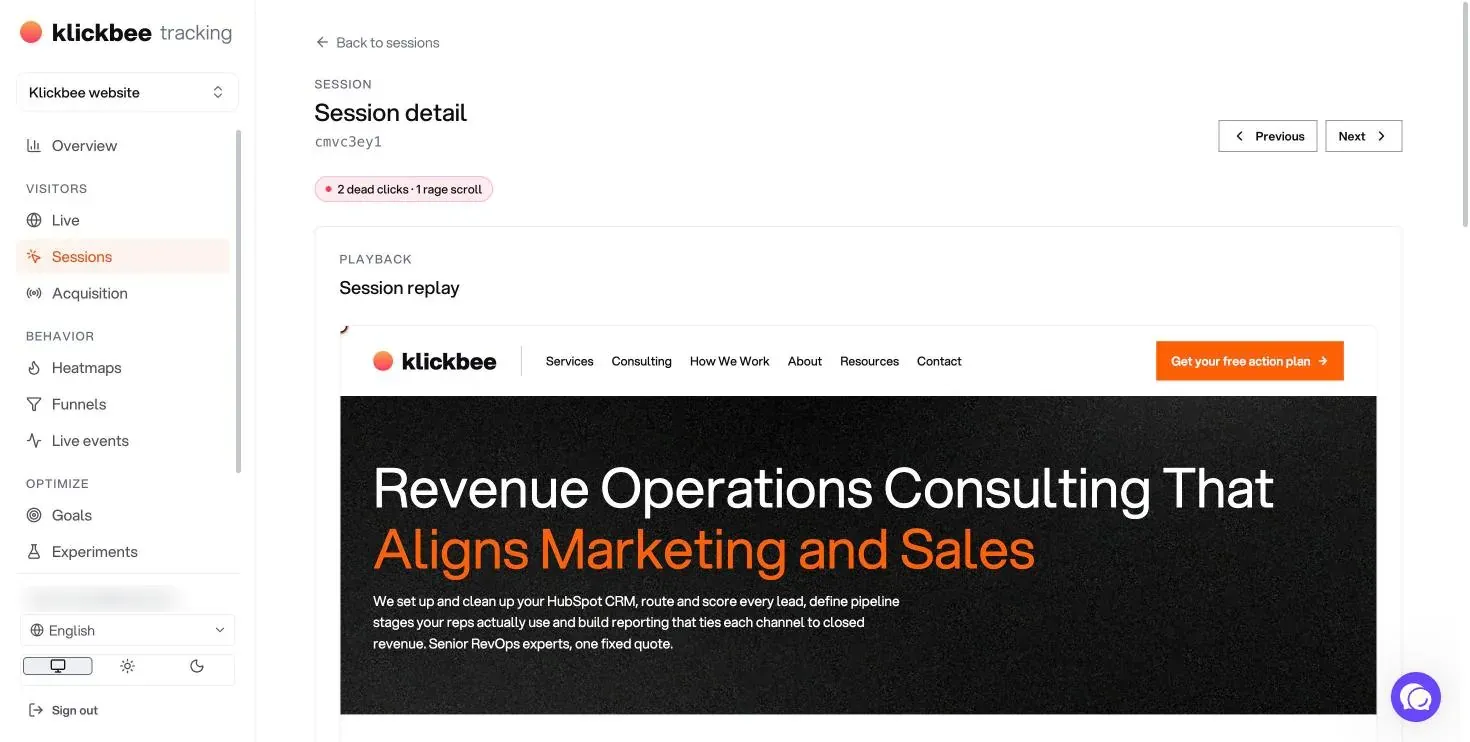
Open a session to replay it the way the visitor experienced it: every click, every scroll, every hesitation, at 1×, 2×, 4× or 8× speed, with a button to skip idle time. Color-coded markers on the timeline take you straight to the seconds that matter, so you never scrub through minutes of video.
An AI summary for every session
Click "Summarize session" and the AI reads the visitor's journey: it summarizes what they did, infers their intent, scores friction out of 100 and lists the friction points. In the example above, a real session on our site, the AI spotted two dead clicks on a form and a rage scroll: the form was not responding as expected. That is the kind of problem that costs leads for weeks without anyone noticing in Google Analytics.
Below the summary, the journey shows the pages visited and the time spent on each, and the timeline lists every event to the second: pageviews, autocaptured clicks and custom events.
Frustration signals
Klickbee automatically flags five behaviors that point to a problem:
Rage click: several fast clicks in the same spot, often on a button that does not respond.
Dead click: a click on something that does nothing, like an image the visitor thinks is clickable.
Quick-back: the visitor opens a page and leaves right away, a sign it was not what they expected.
JavaScript error: a bug that breaks a feature, tied to the session where it happened.
Rage scroll: fast back-and-forth scrolling, typical of a visitor looking for information they cannot find.
Each signal is marked on the replay and counted by page, so you know where to act first.
Heatmaps: clicks, scroll and attention
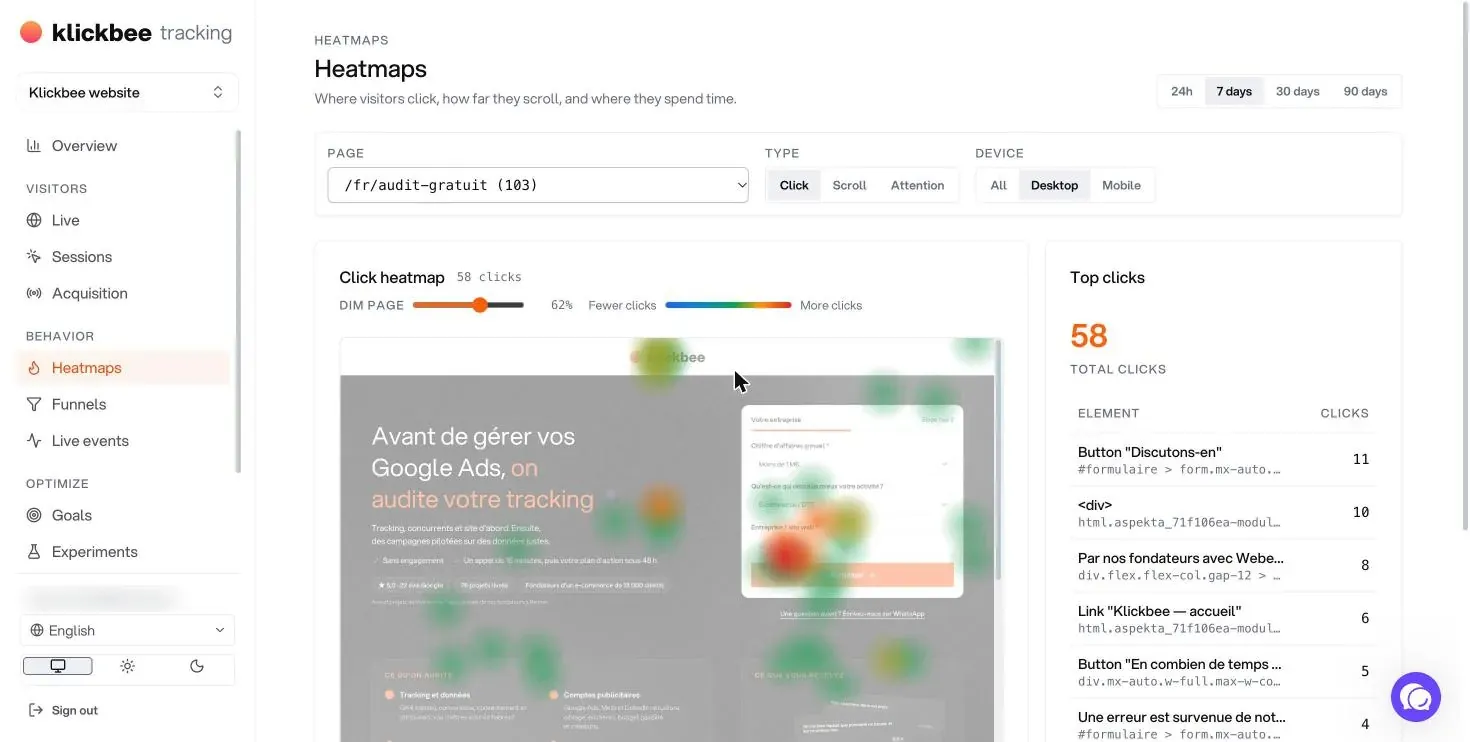
The click heatmap is rendered on the live page, not a frozen screenshot, and splits desktop from mobile so a desktop heatmap never sits on a mobile layout. On the right, the most-clicked elements list shows each button's text and exact location. A slider dims the page so hot spots stand out.
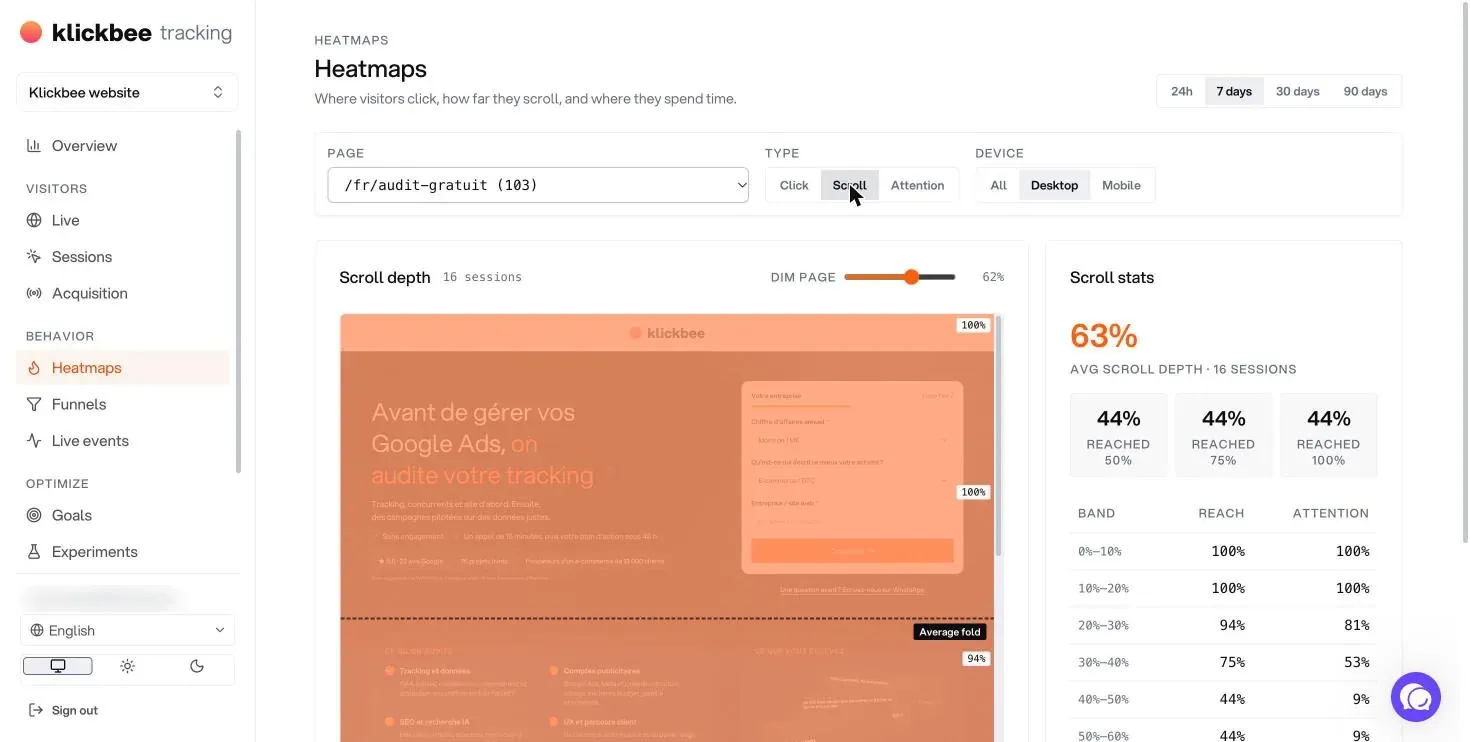
The scroll heatmap shows average scroll depth, the share of visitors who reach 50%, 75% and 100% of the page, and attention band by band. If 56% of your visitors never get past the middle of the page, a call to action at the bottom is only seen by a minority. The Attention view shows where visitors actually spend time.
Funnels, paths and retention
Build a funnel from pageviews, events, clicks or goals, with 2 to 10 steps. Klickbee computes each step's conversion and the median time between steps, and automatically flags the biggest leak, with a link to the sessions of visitors who left. Compare with the previous period, or break down by device, channel or country. Ready-made templates (lead generation, e-commerce, content) and AI suggestions based on your real pages speed up setup.
The Paths and Retention tabs show the most common navigation paths and the share of visitors who come back, cohort by cohort.
Goals and ad conversions
A goal can be a pageview (a thank-you page, for example), an event (form submitted, meeting booked) or a click. Klickbee counts completions and conversion rate over the period, and the AI can suggest goals based on your site.
Each goal can then be sent as a conversion to Google Ads, Meta and LinkedIn. On Pro, conversions go straight from Klickbee's servers to Meta's Conversions API and to Google Ads: they survive ad blockers and browser restrictions, and are deduplicated with the browser pixel. Your campaigns receive more of your real conversions, so their bidding algorithms optimize better. A conversion debugger shows what each platform answers and lets you send a test without waiting for a real visitor.
Pixels, consent banner and cookie declaration
From the Pixels screen you add, enable or remove pixels (Meta, Google Ads, LinkedIn, or any custom code such as GA4, HubSpot or a tag manager) without redeploying your site. Klickbee also generates:
The consent banner, in English, French and Spanish, with configurable position, theme and colors. Your pixels load only after the visitor agrees, and the acceptance rate is measured anonymously.
The cookie declaration, built from the cookies actually detected on your site.
Klickbee itself needs no consent: it sets no cookies and stores no personal data unless your site explicitly sends it. Email addresses sent to ad platforms are hashed. The tool also respects Do Not Track.
A/B tests
The Experiments screen compares variants of a page or element against a goal, with relative uplift and statistical significance. One line of code on your site logs which variant each visitor saw.
Ask your data questions with Claude
Klickbee Tracking has an MCP server. Once connected to Claude (claude.ai, Claude Desktop or Claude Code), ask questions in plain English: "Which pages had the most rage clicks this week?", "Build a funnel from the pricing page to signup and tell me where people drop off", "Create a goal for /thank-you and send it to Meta as a Lead". Claude only sees the sites you are a member of, with your own permissions, and every change is logged. This connection is available on Pro sites.
Pricing
Free, $0: one site, 1,000 sessions per month, analytics, heatmaps and funnels, 7-day replay history, 180-day event history, frustration signals, cookieless.
Pro, $9.99 per month: unlimited sessions, AI (summaries, goal ideas), 60-day replay history, server-side Meta and Google Ads conversions, Claude connection, priority support.
Agency plans are available on request for multiple sites.
FAQ
Is Klickbee Tracking GDPR compliant?
Klickbee sets no cookies, does no fingerprinting and stores no personal data unless your site sends it. Audience measurement can therefore run without a banner. The ad pixels you enable still need consent, and the built-in banner holds them until the visitor agrees.
Does Klickbee Tracking replace Google Analytics?
For a marketing or e-commerce site, yes: audience, sources, campaigns, goals and conversions are covered, plus the replays, heatmaps and frustration signals GA4 does not offer. You can also run it alongside GA4 while you compare.
Do I need a developer to install it?
No. One script in your site's head is enough, and clicks, scroll and frustration are captured automatically. A developer only helps if you want custom events or A/B tests.
How is it different from Microsoft Clarity?
Clarity is free but sets cookies and needs consent for European visitors, which shrinks the share of traffic it analyzes. Klickbee Tracking runs without cookies and adds funnels, goals and conversions sent to ad platforms. We compare both in our best website tracking tools roundup.
Is my data shared with third parties?
No, except the conversions you choose to send to Google Ads, Meta or LinkedIn, with email addresses hashed.
Get started
Create your free account at tracking.klickbee.com: your first site is free, no card needed. If you would rather have us install and configure tracking for you (goals, funnels, Google Ads and Meta conversions), that is the core of our marketing analytics consulting. And to know where to start, get your free action plan.
Louis leads growth and digital acquisition for B2B and e-commerce companies in France and the UAE. Before Klickbee, he co-built and sold an e-commerce business that served more than 13,000 customers. He moved to Dubai in 2026 to work with companies across the GCC.
We compared four website tracking tools for B2B sites: PostHog, Klickbee Tracking, Matomo and Microsoft Clarity. Comparison table, pricing, privacy and who each one is for, with screenshots.
What bounce rate really measures in GA4, how to calculate it, what a good bounce rate looks like by page type, and 12 concrete fixes to lower it on a B2B site.








 Louis Mauclair8 min read